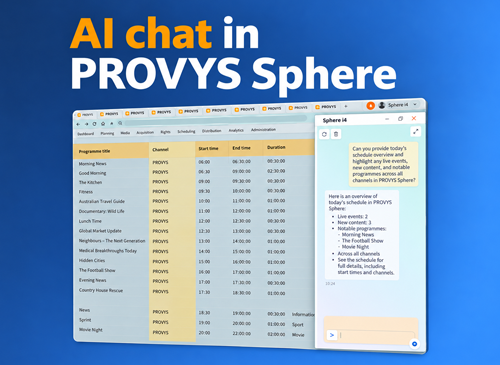
Release 2026/08 adds a Model Context Protocol (MCP) server to PROVYS Sphere. AI assistants, agents and integration tools now have one standard interface to the data broadcast operations run on: schedules, rights, sales and finance. Through it, they can explore the data model, read and update records and run system actions.
The release also brings an OData feed for Power BI and Excel, pivot-table views in lists, multiple frame rates in advertising operations and a dark theme for the web client.
From browsing schemas to running actions
Through the MCP server, an assistant or agent can browse and inspect entity schemas, read records, create, update, copy or delete objects and invoke actions from the metadata catalogue. The interface follows the installation’s live data model, including its site-specific customisations, so it does not need to be maintained separately when that model changes.
An EPG editor could, for example, ask an assistant to check EPG descriptions for tomorrow’s schedule. The assistant follows the relations from the schedule to the scheduled programmes and on to their listings.
The PROVYS Sphere MCP server on our lab channel
On our own lab channel, an AI agent working through the MCP server made around 14,000 changes in PROVYS Sphere, planning 282 film slots in 6 minutes and placing 532 episodes in 15.
Same permissions, same rules
An agent connects as a named user through the PROVYS Security Gateway and gets only the roles you assign to it. If your scheduler cannot see financial data, neither can an agent with the same roles. The same business rules and alerts apply, and nothing changes until a person approves it.
Connect Sphere data to Power BI and Excel
A new OData feed allows compatible business intelligence tools to read Sphere data for reporting and analysis. Teams can use Power BI, Excel or another OData-compatible tool without building a custom interface for each reporting requirement.
The data model is generated from Sphere metadata. Administrators control which entities and attributes are exposed, while each user’s existing permissions remain in force. This allows teams to build reports using familiar tools and controlled access to operational data.
Turn lists into pivot tables
Lists in both the desktop and web client can now be switched into a pivot-table view directly during use, without maintaining a separate configuration.
Users can aggregate values, drill down into the underlying rows and set the dimensions through the standard column editor. A prepared list can therefore serve as the starting point for an ad hoc analysis, allowing users to move between a summary and the records behind it.
Multiple frame rates across advertising operations
Frame-rate consistency remains enforced: content must match the target channel’s frame rate. For customers operating with a single frame rate, system behaviour remains unchanged.
Support for multiple frame rates, introduced for content and linear scheduling in release 2026/05, now extends to the Advertising Traffic System. Advertising for channels using different standards, such as 25 fps and 29.97 fps, can be planned, booked, finalised and billed within one installation.
Regulatory conditions can now use commercial categories when counting spots.
A more practical web client
The web client adds a dark theme, with optional switching based on browser settings, and compact detail views that fit more data on screen. Updated window layouts make better use of the available space.
Improvements to screen loading and scrolling also support everyday navigation through larger lists. These changes accompany further updates to system reliability and authentication, including OAuth2 support for on-premises environments.
To discuss availability and configuration of the MCP server or other release features, get in touch with our team.