Planning and scheduling are key areas of broadcast management that could not exist without each other. Nevertheless, their purpose differs. Let’s look at planning vs. scheduling in practice – and at how you can improve in both.

Planning
Planning is the first, strategic part of channel management process, where you lay the foundations of your future broadcast. Planning focuses on the long-term objectives and directions for your channel.
Typically, planning activities include:
- Budgeting
- Content acquisition and strategy
- Rights management
- Creation of categorized time slots with connections to other content and reruns.
- Weekly content scheduling
- Managing audience flow among daily content
- Decisions about break patterns
- Promotion strategy planning
How to make broadcast planning more efficient?
There are several ways you can try to improve your broadcast planning processes:
Create plans based on rich data
Having access to rich data about your audience and your channel’s performance (especially viewership) is a crucial part of your success. You need to know what content has the highest business value for you and what the viewers like. Therefore, implement solutions that provide you with reliable analytics that can be used as a basis for plans and for reporting to the regulatory authorities.
Also, when planning your content, don’t forget to view as-run logs from previous time period to check for potential problems with the older plans. This way, you may learn from past mistakes and improve your plans.
Step into higher level with automations
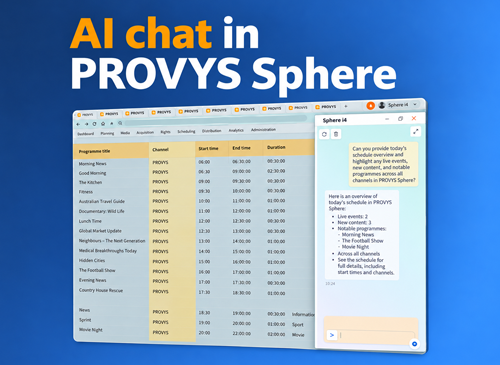
Speed up your work by using smart tools that do tiresome manual tasks for you. Instead of spreadsheets, use robust broadcast management systems (BMS) like PROVYS Sphere that offer automations, such as automated rights verification or AI assistants.
Make planning smoother with app integrations
Planning often involves use of several software tools. And that’s when human errors and inefficiencies tend to happen. Improve your planning workflows by interconnecting your systems (e.g., playout and BMS) to speed up the process, avoid chaos and unnecessary mistakes.
How does this work in practice? For instance, PROVYS Sphere can be easily integrated with Stream Circle playout, and Sphere’s robust database can be used as a centralized source of data for your playout.
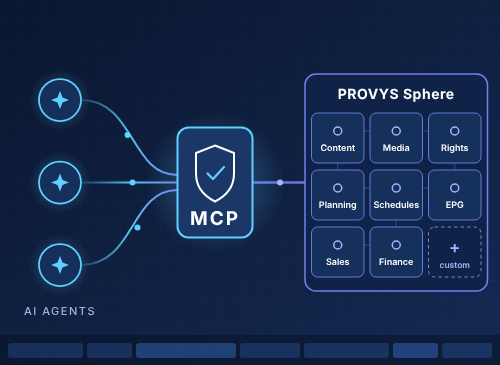
Tip! PROVYS Sphere provides you with a range of prebuilt integrations, about 40 import/export options, MCP integration for AI agent systems, and generic ServerAPI that make the integration process easier.

Scheduling
When the long-term plans are ready, it’s time to go deeper into the details and plan for the short-terms. And that’s when scheduling comes into play.
Scheduling activities usually include:
- Adding interstitials, ads and promotions to the schedule
- Scheduling of secondary events
- Checks of planned materials before transmission
- Playlist delivery
Tips for efficient scheduling
To speed up the process and get rid of unnecessary manual tasks, try these steps:
Use scheduling templates
Some of the broadcast patterns tend to repeat every week. Whereas some content uses the same time slot every day (e.g., evening news), other content is broadcasted only during weekends or every other week. Prepare a template for your usual broadcasting week to save time and hasten scheduling of commercial breaks and other content.
Or alternatively, use a prebuilt template in your planning system to make it even quicker. In PROVYS Sphere, for instance, you can build structured plans that utilize custom scheduling patterns. This way, you always have a clear overview of your weekly plans and broadcast management gets more efficient—so you can focus on picking the right content for your audience.
Start with bulk-scheduling
Series are a very common part of channels’ schedules–and they often have dedicated time slots that regularly repeat. Make your work easier by scheduling this content in bulk and save yourself time in the future.
Tip! With PROVYS Sphere’s chain scheduling features, you can plan out entire seasons of serialized content in just a few moments.
Automated programme checks
Let the software do tiresome work, like checking your daily schedules for mistakes and overlaps, for you. BMSs like PROVYS Sphere usually offer functionalities that help you verify and finalize the schedules. For instance, PROVYS Sphere checks if your schedules comply with content licences and parental guidance; or if your promotions have valid timing. Learn to implement automated checks to your workflows and make your daily broadcast management more efficient.
Need more advice? See our useful tips on efficient broadcast operations.
Planning vs. scheduling: key differences
Whereas planning focuses on the big picture and the long term, scheduling is more about the short term and specific details.
In the planning phase, your goal is to set a strategy, budget and general objectives for your channel. In the scheduling phase, you use them as a basis for carrying out the tactical and operational activities.
PROVYS Sphere can assist you in both of these areas. Create refined plans for linear and non-linear broadcast, fill them with your content & promotions, and monetize your broadcast to the maximum. See PROVYS Sphere details.
Interested in this topic? Read also 4 tips on how to speed up channel management thanks to integrations.